Posts

6 Key Improvements in Android M for Better User Experience

Image
6 KEY IMPROVEMENTS IN ANDROID M FOR BETTER USER EXPERIENCE 6 Key Improvements in Android M for Better User Experience  :Google I/O May 28,  Moscone Centre West, San Francisco, CA :  Google annual developer conference 2015 kicked off at 10 PM Indian Standard time. The packed conference hall was awaiting the Google Boss Senior Vice -president Sundar Pichai. The event is watched by 2 million people around the Globe by tech and Android enthusiast not to say the Apple guys. HOW GOOGLE IS MOVING FROM MOBILE ONLY PLATFORM TO A WHOLE NEW ECOSYSTEM? Android Reach and Distribution –  Sundar Pichai first gave an  8 of the 10 phones shipped globally are based on the Android System and there are 400 plus OEMS making Android smartphones. Android Auto –  Sundar Pichai annouced that the Hyuandai Sonata , GM and Volkswagon , Ford, Mitsibushi will come with the Android Auto. Android TV –  Sony and Sharp will start shipping with Android ,  Nvidi...
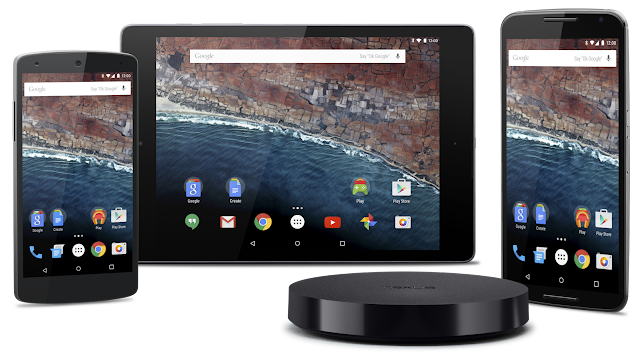
Android M

Image
Android M Developer Preview & Tools Today at Google I/O, we announced a developer preview of the next version of Android, the M release. Last year’s developer preview was a first for Android and we received great feedback. We want to continue to give you developers early access to Android so you have time to get your apps ready for the next version of Android. This time with the M Developer Preview, we will provide a clear timeline for testing and feedback plus more updates to the preview build. The Android M release: improving the fundamentals For the M release, we focused on improving the core user experience of Android, from fixing thousands of bugs, to making some big changes to the fundamentals of the platform: Permissions  - We are giving users control of app permissions in the M release. Apps can trigger requests for permissions at runtime, in the right context, and users can choose whether to grant the permission. Making permission requests right when they’re...

How to Whatsapp Call Feature (Updated)

Image
Just Download thw Whatsapp from below link to use whatsapp call feature for free. Whatsapp 2.12.23 Apk WHATSAPP CALLING: Call your friends and family using WhatsApp for free, even if they’re in another country. WhatsApp calls use your phone’s Internet connection rather than your cellular plan’s voice minutes.* (Note: you can’t access 911 and other emergency service numbers through WhatsApp).

Windows 10. Do great things. (Technical Preview)

Image
The Windows you know, only better Windows 10 feels familiar so you can get more done from the get‑go. The Start menu is back with space to pin your favorite apps. And simple navigation means you don't need to spend much time learning anything new. Always up‑to‑date You won't have to wonder if you have the latest features or security updates. Windows automatically delivers updates, when they're ready, directly to your device. Easy to do, quick to act Windows 10 has new ways to make you a multi‑tasking expert, with great features like Action Center, where all your notifications and key settings are on one easy‑to‑reach screen, for immediate action. Rule the web Project Spartan is an all‑new browser built t...

Download Windows 10 Technical Preview ISO

Image
Follow these steps to download Technical Preview: Sign up for the Windows Insider Program, if you haven't already. Read the system requirements. Click one of the Download links on this page to download a special file—it's called an ISO file—that you can use to install the preview. When the download is complete, transfer the ISO file to installation media such as a USB flash drive or DVD. Boot your PC from the installation media, and then follow the steps to perform a clean install. Important You'll need a third-party program to convert the ISO file into installable media—DVD burning software often includes this capability. Remember, trying out an early build like this can be risky. That's why we recommend that you don't install the preview on your primary home or business PC. Unexpec...

Giveaway By Chirag Chandnani

Image
A Giveaway by simply Shareing this blog on Facebook or Twitter or any other Social website. The Giveaway will contain A Branded T-Shirt, Branded Headphones and A Branded Phone Back Cover of your Desire Phone. There will be three winners. The post which will get the most Like+Comment+Share will win the Giveaway. Just tag me on your post. My facebook id is www.facebook.com/chirag.chandnani2 and put #chacked as the hash tag. Come on guys. Lets get started.

Moto E (2015) 2nd Gen

Image
    Specifications Operating system Android™ 5.0 Lollipop System Architecture/ Processor Qualcomm ® Snapdragon ™ 200 processor with 1.2 GHz quad-core CPU, Adreno 302 with 400 MHz GPU Memory (RAM) 1GB Internal Store 8 GB* Removable storage: Supports up to 32GB microSD card Dimensions Height: 129.9 mm Width: 66.8 mm Curve: 5.2 - 12.3 mm Weight 145 grams (5.11 ounces) Display 11.4cms (4.5") qHD 540x960 245 ppi IPS Corning ® Gorilla ® Glass 3 Anti-smudge coating Battery 2390 mAh Mixed usage up to 24 hours** Water Resistant Coating Yes Networks GSM/GPRS/EDGE, UMTS/HSPA+ Bands Moto E Global GSM: GSM/GPRS/EDGE (850, 900, 1800, 1900 MHz) UMTS/HSPA+ (850, 900, 1900, 2100 MHz) Rear Camera 5 MP f / 2.2 aperture Quick Capture Tap anywhere to capture 4X digital zoom Burst mode Auto HDR Panorama Tap to focus Front Camera VGA SIM Card Micro-SIM, Dual-SIM Connectivity Micro USB, 3...

Update Moto G 2nd Gen XT 1068 To Lollipop

Image
  Is lollipop sweet? Or you haven’t got a chance to taste it? Now that you are here, You will get the chance to taste the lollipop. And trust me, it’s sweeter than ever! Well, enough being sweet, let’s continue to the topic. This guide will show you how to update Moto G 2nd Generation XT 1068 (Indian Dual Sim Version) to the official lollipop update. The best part is, you don’t need unlocked bootloaders, custom recoveries or root access to flash this update. So, you can taste the lollipop without any loss of warranty. Note - Make sure you have atleat 50% battery on your phone. The update will not wipe the data on your device. You need to be running the latest on system version “21.11.23.titan_retaildsds.retaildsdsall.en.03″ and build no “KXB21.85-23″ to apply the update. You can check your system version and build number by going to Settings->About Phone. Make sure that your device’s bootloader is locked and is running stock android version 4...

Update Moto E XT1022 To Lollipop

Image
Yes, you’ve heard it right. We’ve got lollipop for our beloved Motorola Moto E. Isn’t it funny when you see that a 6000 Rs device has got a software update earlier than those 50,000 Rs devices? I know you might be reading the above lines with least curiosity. So let’s continue for what we are here for, the Lollipop Drama! In this short little guide, I will show you how to install lollipop on Moto E. And yes, it’s all official. Nothing is custom and so, you don’t need unlocked bootloader, custom recovery, or root access to install the update. All you need is an indian retail version of the Motorola Moto E which is running stock version of android and has a locked bootloader. And yes, even after updating using the methods given below, you will get future updates. Notes - Make sure that you are running completely stock version of android before applying the update. Do not try to apply the update with custom recoveries as it may hardbrick your device. Make ...

Snapdeal Cash Rs. 50 Free and Rs. 50 Per Refer Snapdeal Promotion

Image
Snapdeal AppShare Download Snapdeal App using invite code dGDX730119& Earn Rs.50. To download click http://mobileapi.snapdeal.com/referral/apps/download/dGDX730119 Snapdeal is offering Snapdeal free credits on downloading its official app on your mobile. Not even this on referring your friends through referral code, you will get credits again in your account. You can earn the maximum of 250 SD cash in your account and offer valid only for first time download can get this offer . How To Get Instant Rs. 50 Snapdeal Cash In Your Account : Go to   Snapdeal App   on your mobile Login or signup to your account snapdeal account . Then go to menu and apply referral code -   dGDX730119 You will get Rs 50 free SD cash and 50 per referral . SD cash in your account will expire in 30 days .